1 Answers
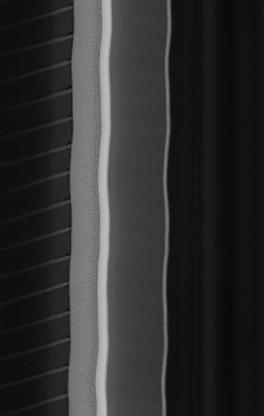
问题中描述“扭曲”,猜测是把真实直线拍摄成了图中扭曲的曲线,简单采用轮廓定位后与参考直线对比如下:
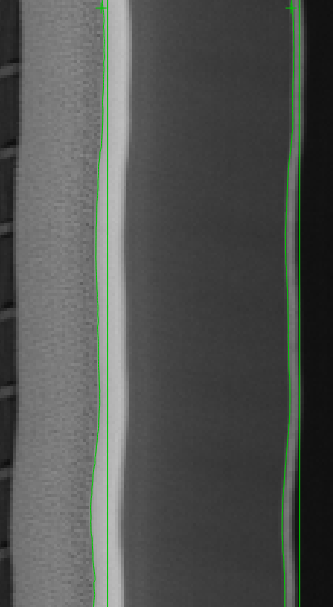
发现沿y方向存在不同程度的x方向的抖动,其同一行不同位置抖动相似,判断可能是类似线扫相机情景下导轨弯曲或振动导致的图像扭曲畸变。由于只有一张图像,故简单采用每一行轮廓点与参考直线位移作为标定参数进行校准,得到如下矫正效果(左)与原始图(右)对比:
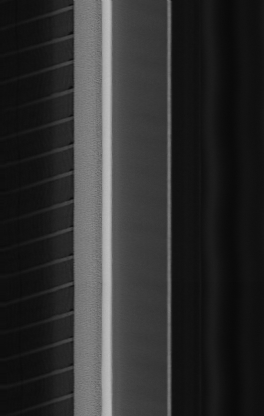
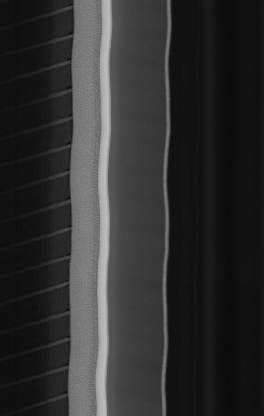
效果较大程度上受到轮廓定位算法的影响,若有拍摄得到的标定版图像则可以使用灵闪标定工具下的线扫相机标定得到更精细效果。
简单代码如下
import cv2, numpy as np
from pathlib import Path

def main():
    img = cv2.imread("test.png", cv2.IMREAD_UNCHANGED)
    if img.ndim == 3:
        img_gray = cv2.cvtColor(img, cv2.COLOR_BGR2GRAY)
    else:
        img_gray = img
    h, w = img_gray.shape

    raw = Path("cal.txt").read_text(encoding="utf-8").strip().split()
    vals = [float(x) for x in raw]
    u = np.array(vals, dtype=np.float32)
    # length guard
    if len(u) < h:
        pad = np.full(h - len(u), u[-1] if len(u)>0 else 0.0, dtype=np.float32)
        u = np.concatenate([u, pad])
    elif len(u) > h:
        u = u[:h]

    map_x = np.tile(np.arange(w, dtype=np.float32), (h, 1))
    map_y = np.tile(np.arange(h, dtype=np.float32).reshape(-1, 1), (1, w))
    map_x_src = map_x - u.reshape(-1, 1)  # positive u => shift row right

    out = cv2.remap(img_gray, map_x_src, map_y, interpolation=cv2.INTER_LINEAR, borderMode=cv2.BORDER_REPLICATE)
    cv2.imwrite("remap.png", out)

    cv2.namedWindow("Straightened", cv2.WINDOW_NORMAL)
    cv2.imshow("Straightened", out)
    cv2.waitKey(0)
    cv2.destroyAllWindows()

if __name__ == "__main__":
    main()
标定参数可以直接使用上文效果图对应参数
cal.zip
或通过task的方式自行调整导出,灵闪3.8,3.9版本均应适用easyCal.task